Custom Response Header in Django

So I was wondering on how to build a habit of writing blogs daily, and my friend suggested that we could write about the little things we learn everyday, so we decided to start a series called Today I Learned where we will write about the little things we learn everyday, and thus build a habit
I was creating this REST API for one of my clients and I was thinking what is the proof that I made this app, and I was totally blank because only proof I will have is the payment I will be receiving from the client.
So I thought, what if I implant something in the response header that will scream that I have created this API or web-app or whatever.
In this post, I will be documenting how we can create our own header attribute to responses in Django.
Method 1 - Local Header
In this you can add a custom header attribute to one response. For example, imaging you are creating an auth APi and you want to send an encrypted token as a response header. For that the view function will be something like this.
def auth(req):
    # DO AUTH RELATED STUFF
    data = {
        'status': 200,
        'message': 'Authenticated'
    }
    res = JsonResponse(data)
    res['Auth-Token'] = getToken(user)

    return res
And when you see this response header, you'll see your custom header "Auth-Token".
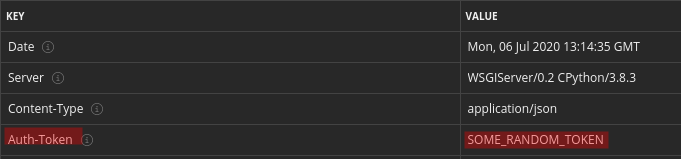
The problem with this method is that you have to repeat this process for all your view functions, what if you want to send a custom header with all your response.
Method 2: Global Header
Step 1: Create middleware.py file
Create a middleware.py file in one of your app folder and inside that write this code.
class CustomHeaderMiddleware:
    def __init__(self, get_response):
        self.get_response = get_response

    def __call__(self, request):
        response = self.get_response(request)
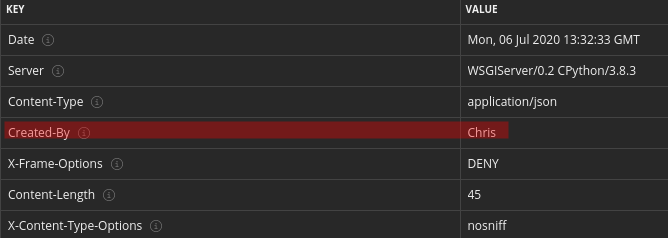
        response['Created-By'] = "Chris"
        return response
You can write whatever you want in place of "Created-By" but this is my purpose.
Step 2: Register Middleware in settings.py
Open settings.py file and add this line to MIDDLEWARE list.
MIDDLEWARE = [
    .
    .
    .
    'django.contrib.messages.middleware.MessageMiddleware',
    'django.middleware.clickjacking.XFrameOptionsMiddleware',
    'APP_NAME.middleware.AuthorHeaderMiddleware'
]
Replace "APP_NAME" with whatever app name inside you've created the middleware.py file.
Now if you check the response headers you'll see that custom header.
So that's it for this "Today I Learned" post.


